Posts

Why Google Adsense Disapprove Your Application

Image
It is no longer news to bloggers and some other internet entrepreneurs that Google AdSense is one of the most legitimate ways bloggers or site owners make cool cash online by placing Google client adverts on your blog or site then you earn through a pay per click system. Knowing this is like wow I have got a place to make cool cash from after other triers from other advertising sites, but hey it is not that easy to get the your account approved by Google AdSense team for you to start making cool cash immediately. Earlier before now I had applied for AdSense but unfortunately for me my account was declined by the team though asking me to resubmit the request after my site has been fully built. Now they sent me a mail informing me for the unapproved but also contained the reason and why my request wasn't granted which are the things am going to be sharing with you on this post  Now let’s get straight to the point. By now you should have known that before appl...

How To Change Your Facebook Username

Image
Having a Facebook username can help your friends locate your profile page or timeline on Facebook as easy as the alphabets, without searching all through Facebook with a name they think you may be using. When you have a Facebook username you actually have a URL to your page, like a site domain but yours is a directory from Facebook's files example www.facebook.com/tipsupload The above URL is actually the Facebook page for this blog but you are going to be seeing how to change that of your page and your own personal profile username. Using the username your friends can as well search for you on Facebook with it which will actually be the first username displayed by Facebook's search engine that is if there were no typical error. > To do this, you need to first of all log in to Facebook with your account details > when you are logged in, go to www.facebook.com/username you will see a button which will ask you if you do like to continue with your profile name...

The New Face Of Gmail's Inbox

Image
One of the biggest and most used mail server Google mail just changed their mail box interface For easy mail access, they has now classified the list of  mails with tabs just above the mail's environment  bellow shows the new face of the mails page

PIXLR: Make An Amazing Photograph And Remove Your Image Background Online

Image
Without the use of any design-able software on your system you can still beautify, remove background and frame you images online without any form of stress as well as making it look nice by adding some effect without paying a dime to any one to do it for you. Design an image for your social media profiles and for your personal use that will suite your taste with PIXLR PIXLR PIXLR is an online free photo editing site that has three wonderful editing options The Advanced, The Efficienct and The Playful The advance part of the editor looks so much like Adobe Photoshop which you can actually use and do the same thing to your picture just like in Adobe Photoshop, this advance option has most of adobe photoshop's tools, effects and resemblance  (screen shot bellow open click on it and view in a larger size)

AddMeFast: Grow Your Social Network

Image
Spreading your news online to get to thousands of audience with social media is another difficult task to do for free for newbies like bloggers etc but still, there are some sites that helps us grow them for free without any form of payment and one of them is what I want to show to you quickly which I have used and I think you should give it a try

Get Flip-able Android Reader With Book Shelf

Image
Hello readers, I want to use this opportunity to introduce to you a flip-able android reader with a book shelf, I have been using this for a couple of months now on my LG android 2.3.6 ( LGE LG-E405 )  phone and it gets  more interesting day by day. I actually downloaded this from the opera mini app store where I do most of my android free app downloading  but from a vigorous research I have come to know that you can as well find it from the Google play store on your Mobile phone

Translate Your Document To Any language With Google Doc

Image
If you have a document that you had written then you realized that you need different languages for the document lets say eBook, here is the good news you can translate them to any other languages being it Spanish, french etc with This wonderful service provided by Google called Google Doc Translate Document. This service help you upload your your files online, get the download link and also being able to share the uploaded fill with your friends but this is more like backing up your files online to avoid lost when you have a disk break down or other damages on your computer which can affect your documents just like 4shared -----you can also read how to link your Google doc file to 4shared web store If you have a text file on your system which you think can sell more when you use another language in publishing it. Then you can actually have them in different languages without rewriting the whole file with different languages with this Google service.

USSD Code For All Mtn Services, Settings And Tools

Image
If you are an MTN user you will definitely need help on how you can activate some of their services and settings one day, but MTN has made it easier for their dear users to access all this things at only on a press of the green button. Through this service you can actually check and activate their internet bundle plans , activate a new Prepaid plan, know your phone number, request for an automatic internet configuration and many more.

How Blogger Custom Errors And Redirect Settings Works

Image
This blogger blog feature had already been introduced before the new Google plus comment form on blogger , but I want to use this opportunity to explain how this works for those whose platform is blogger. Blogger custom errors and redirect Help bloggers in some of these ways  ->This helps bloggers to make an html page for their deleted pages or URLs that does not exist on their blog -->This also help to redirect pages or links you intentionally deleted to a specified page or URL  Bellow you are going to be seeing how to actually set this thing up for your blog

How To Move Gmail Chat To The Right

Image
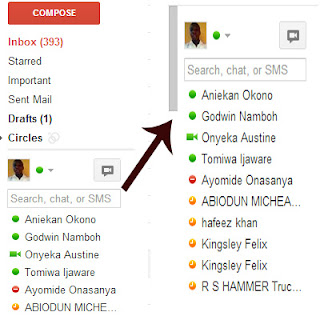
If  you have a Google account you will automatically have access to some of these great sites like picasa, Google+, G-mail, Google doc, blogger etc. Now when you sign in to Google+ or G-mail using the Google account you had open, you will be able to chat with your friends whom add you to their circle on Google plus. The g-mail chat box normally has it float to the left hand side of your account environment but you can actually float it or move it to the right hand side of your G-mail inbox environment by using of the tools found in the G-mail labs page. This will make it look much like that of Facebook's chat and you will be learning how to do this on this page.

How The New Google+ Comment Thread On Blogger Works And How To Activate

Image
Commenting is the best way an author can connect with his readers know what they feel about his post, what they suggest and how it has helped them. Google just introduced a new comment thread for bloggers, which looks like the Facebook comment plugin  Benefits of using the new blogger comment thread  1. if you are using this new comment thread you will read both your blogger comments and Google+ comment all in one place  2. all discussion about your blog post content will also appear on your post both the replies 3. those who share your blog post on Google plus will be shown on your blog post as comment-er. 4. your readers can choose whether they want their comment to be public, private or within their friends and many more benefit like in your blog proper optimization ( seo )

Reduce Blogger Awesome Inc Template Inner Background Column Width

Image
Since I started blogging, blogger awesome inc template has always been my favorite template, but I hate the fact that it has a 100% (percent) width for the content column thereby not being able to add  inner background color like other template. But when I discovered that there is a way of deactivating the hundred percent width to your desirable width like the normal 960px, I haven't leave it even a bit or think of using any other blogger template below is how I reduced the width from percentage to pixels  Benefits 1. this is a way of giving you blog template a more professional look , now having the power to make the content column white or any other color and using a different color for your blogger outer background 2. you can reduce the width of the tab from 100 percent to your desirable pixel or percentage 3.  this also apply to the header and footer environment

Wow! I Send My New Twitter Followers An Auto Direct Message And Tweet

Image
This post's tutorial has already been written on this blog, well at the time I wrote the tutorial on this blog I did not try it but activated it for my account, been the only post on this blog that was not tried before publishing but still worked .  I wrote this post then a week after publishing, i was checking my direct messages and i saw a whole lots of message being sent but was confuse on seeing all those messages and was wondering how i sent them all  but when i read the messages they were all the same then i remembered that i activate an auto direct message to my blog new follower and bellow is an image showing an example of them and a link to the tutorial.

How To Untag YourSelf From A Photo On Facebook

Image
You know when you like or comment on a status on Facebook with an image attached to the status, the photo or image will automatically be tagged to your Facebook timeline Also photos that some of your friends post on your timeline are found there as well Now when a friend log in to Facebook and view your profile or timeline  he or she will definitely see those pictures on your timeline while viewing your profile, he or she may wish to click on the see all link to view all the images This is also a simple way of removing nude images you might have liked from your timeline Lets cut the long story short and go straight to how this can be done on Facebook -> Go to facebook and log in with your facebook account details -> Click on your profile image at the to right corner of your facebook home environment you will be taken to your Facebook profile or timeline environments where you will only see your activities on facebook -> Now scroll to the right hand side of th...

Block Unwanted Sites Using Fire-Force Web Browser

Image
Looking for a way to block some sites using your fire-force web browsers add-ons, to deny access to the site is possible and very easy to do.  Before you will be able to do this, you have to first of all search for the add ons from firefore then install. Now this is a way of doing this -> Launch your fire-force browser software -> click on the tools option from the menu bar then add ons (Note make sure that you have already been connected to the internet because it uses internet connection to search and install the add ons ) -> once you are there click on the "get add ons" text and search for the word "blocksite" it loads then find it. This should be the first result among others but if its not then still look for the block site add ons

How Do I Post A Long Status On Twitter ?

Image
We all know that you can not post an update on twitter that is more than 140 characters in size just like how you can not use one email address to open more than one twitter account but we have a tip on how you can use one email and open more than one twitter account  We also want to show you a simple and short where you can over come this character limitation in the aspect of updating your status on twitter. All you need to do is to follow this tips gently and you will surely do it when ever, how ever and where ever you need to do it.

How To Block An Email From Sending You Mails On Your Yahoo Account

Image
Do you have someone in-boxing you mails on your yahoo account which you don't want, being a yahoo user, you will be able to block that person's email from sending spam messages to you. Now if you have one here is a simple procedure to do it. bellow are the steps you can follow to do that  -> Go to yahoo website and lo-gin with the account you receive the mails with -> after logging in or signing in, just navigate to your mail box by clicking on the mail link or image When you are on the mail environment scroll to the top right of the environment and scroll over the settings icon which is the second icon at the top right side of the environment while your mouse pointer is still on it, click to open the "mail option" there.     Now on the new page is the general settings for your mails -> Scroll to the left hand side bar -> look for "block addresses" then click to open. when it opens. the environment will look something like this de...

Add Auto ReadMore And Remove The Initial JumpText Link To Blogger

Image
Blogger jump-text is a summary of all your recent post depending on the amount of posts you selected to appear on your homepage, this jump-text contain an image, summary of the post and a link that will lead the reader to the main page of the post Now adding an auto read more can help you to select the amount of characters to display on the homepage, the size of the image and  its position either to the right or to the left.  In this simple and short tutorial, you will get to learn how to add the auto read-more and how to remove the initial read-more blogger read more or jump-text link to your blogger

Add Google+ Followers Box To Your Blogger Blog

Image
Google plus is one of the fast growing social network today, this social network allows you to share your thoughts or stories, chat with your friends like status and page even many more features . Due to their effective growth over the years, have developed one of their features use by bloggers and others to grow audience to their page to look like other social networks e.g Facebook What is this feature  The feature here is the followers feature which Google plus has now develop to looks like that of Facebook like box. Now when a readers visit your blog when you install this, he/she will be able to follow your blog on G+ although they have the follow button but the new one shows your face just like when  you like a page on Facebook from from the site then your face displays on the box

How To Hide A Facebook User's Status Update From Your News Feed

Image
If you do like to make some particular post to be hidden from your facebook wall, here is way of doing that. Maybe to stop seeing the post scrolling through your wall when others like and comment on the post just like you did, bellow is a way of doing that While you are on your Facebook home page , where you will be seeing different posts from friends, liked page and public update from non friends . Now, maybe after commenting on the post or after just liked the post and you have being seeing the post on your wall when other friends do likewise, but you are tired of seeing this post then Hide it this way 1. Scroll to the right hand side of the post 2. You will see a V looking image click on it Now wait for a while you will see a drop down layer containing two information which are