Posts

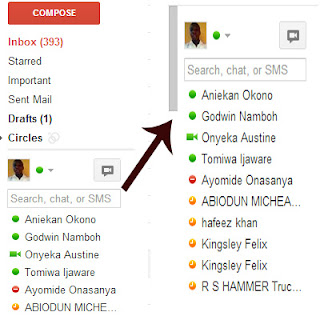
How To Move Gmail Chat To The Right
Image
If  you have a Google account you will automatically have access to some of these great sites like picasa, Google+, G-mail, Google doc, blogger etc. Now when you sign in to Google+ or G-mail using the Google account you had open, you will be able to chat with your friends whom add you to their circle on Google plus. The g-mail chat box normally has it float to the left hand side of your account environment but you can actually float it or move it to the right hand side of your G-mail inbox environment by using of the tools found in the G-mail labs page. This will make it look much like that of Facebook's chat and you will be learning how to do this on this page.

How The New Google+ Comment Thread On Blogger Works And How To Activate

Image
Commenting is the best way an author can connect with his readers know what they feel about his post, what they suggest and how it has helped them. Google just introduced a new comment thread for bloggers, which looks like the Facebook comment plugin  Benefits of using the new blogger comment thread  1. if you are using this new comment thread you will read both your blogger comments and Google+ comment all in one place  2. all discussion about your blog post content will also appear on your post both the replies 3. those who share your blog post on Google plus will be shown on your blog post as comment-er. 4. your readers can choose whether they want their comment to be public, private or within their friends and many more benefit like in your blog proper optimization ( seo )

Reduce Blogger Awesome Inc Template Inner Background Column Width

Image
Since I started blogging, blogger awesome inc template has always been my favorite template, but I hate the fact that it has a 100% (percent) width for the content column thereby not being able to add  inner background color like other template. But when I discovered that there is a way of deactivating the hundred percent width to your desirable width like the normal 960px, I haven't leave it even a bit or think of using any other blogger template below is how I reduced the width from percentage to pixels  Benefits 1. this is a way of giving you blog template a more professional look , now having the power to make the content column white or any other color and using a different color for your blogger outer background 2. you can reduce the width of the tab from 100 percent to your desirable pixel or percentage 3.  this also apply to the header and footer environment

Wow! I Send My New Twitter Followers An Auto Direct Message And Tweet

Image
This post's tutorial has already been written on this blog, well at the time I wrote the tutorial on this blog I did not try it but activated it for my account, been the only post on this blog that was not tried before publishing but still worked .  I wrote this post then a week after publishing, i was checking my direct messages and i saw a whole lots of message being sent but was confuse on seeing all those messages and was wondering how i sent them all  but when i read the messages they were all the same then i remembered that i activate an auto direct message to my blog new follower and bellow is an image showing an example of them and a link to the tutorial.

How To Untag YourSelf From A Photo On Facebook

Image
You know when you like or comment on a status on Facebook with an image attached to the status, the photo or image will automatically be tagged to your Facebook timeline Also photos that some of your friends post on your timeline are found there as well Now when a friend log in to Facebook and view your profile or timeline  he or she will definitely see those pictures on your timeline while viewing your profile, he or she may wish to click on the see all link to view all the images This is also a simple way of removing nude images you might have liked from your timeline Lets cut the long story short and go straight to how this can be done on Facebook -> Go to facebook and log in with your facebook account details -> Click on your profile image at the to right corner of your facebook home environment you will be taken to your Facebook profile or timeline environments where you will only see your activities on facebook -> Now scroll to the right hand side of th...

Block Unwanted Sites Using Fire-Force Web Browser

Image
Looking for a way to block some sites using your fire-force web browsers add-ons, to deny access to the site is possible and very easy to do.  Before you will be able to do this, you have to first of all search for the add ons from firefore then install. Now this is a way of doing this -> Launch your fire-force browser software -> click on the tools option from the menu bar then add ons (Note make sure that you have already been connected to the internet because it uses internet connection to search and install the add ons ) -> once you are there click on the "get add ons" text and search for the word "blocksite" it loads then find it. This should be the first result among others but if its not then still look for the block site add ons

How Do I Post A Long Status On Twitter ?

Image
We all know that you can not post an update on twitter that is more than 140 characters in size just like how you can not use one email address to open more than one twitter account but we have a tip on how you can use one email and open more than one twitter account  We also want to show you a simple and short where you can over come this character limitation in the aspect of updating your status on twitter. All you need to do is to follow this tips gently and you will surely do it when ever, how ever and where ever you need to do it.